





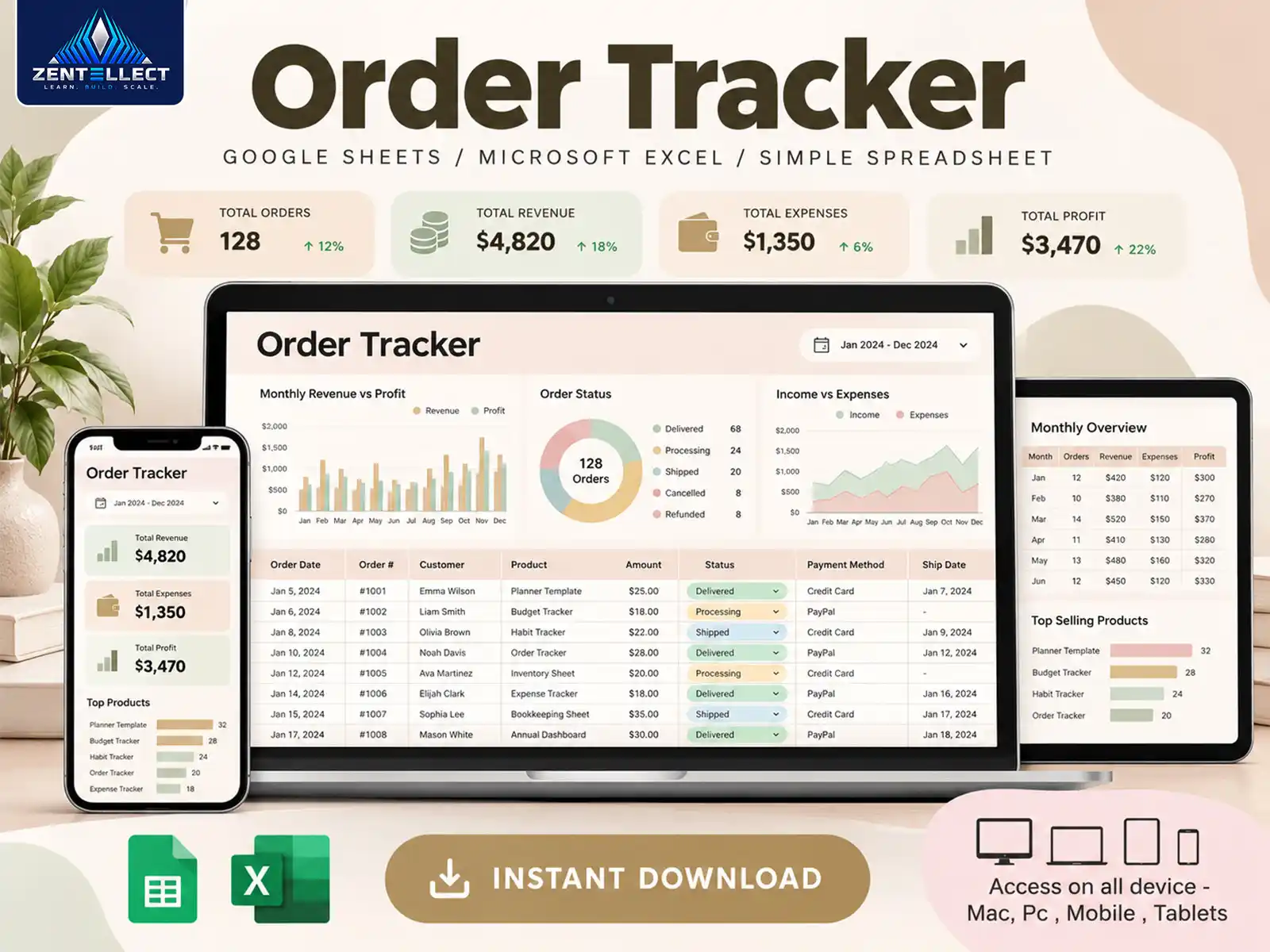
Order Tracker
₹1,000.00 ₹599.00
Frequently Bought Together!
Product details
Every Order Organized. Every Deadline in Sight. Every Customer Matters. 📦 Take control of your sales and order management with the Smart Order Tracker — your all-in-one digital order management system designed to help you organize customer orders, track payments, monitor fulfillment, and manage delivery schedules in one convenient place. From new orders and pending payments to packing, shipping, and completed deliveries, keep your entire order workflow organized without the confusion of scattered records. Less Order Confusion. Faster Follow-Ups. Happier Customers. Get Your Order Tracker Today — Stay Organized, Fulfill Orders with Confidence & Keep Your Business Moving!
Track Every Order. Manage Every Step. Deliver a Better Customer Experience.
Tired of juggling customer orders, missing important delivery dates, forgetting payment follow-ups, or struggling to remember which orders have already been shipped?
As your business grows, managing orders through messages, notebooks, and scattered spreadsheets can quickly become overwhelming.
One missed order or delayed follow-up can lead to unnecessary stress, lost time, and dissatisfied customers.
It's time to simplify your order management.
Introducing the Smart Order Tracker — an easy-to-use digital order management spreadsheet designed to help entrepreneurs, small businesses, online sellers, and product-based businesses organize customer orders, monitor fulfillment, track payment status, and manage delivery commitments.
Whether you're handling a few orders a week or managing a growing customer base, this tracker helps you stay organized from order placement to final delivery.
One Smart Tracker. Every Order Under Control. A Smoother Business Workflow.
KEY BENEFITS — WHY YOU'LL LOVE IT
✔ Keep Every Customer Order Organized — Record order details, customer information, products, quantities, and order dates in one structured system.
✔ Track Orders from Start to Finish — Monitor each order through stages such as New, Processing, Packed, Shipped, Delivered, and Completed.
✔ Stay Ahead of Delivery Deadlines — Keep expected dispatch and delivery dates visible so you can plan fulfillment more effectively.
✔ Monitor Payments & Outstanding Balances — Organize payment amounts, payment status, and pending customer payments.
✔ Simplify Order Fulfillment — Know which orders need processing, packing, dispatching, or follow-up.
✔ Reduce Missed Orders & Delays — Maintain a clear view of pending activities and improve order management consistency.
✔ Organize Customer Information — Keep customer names, contact details, and order references accessible for easier communication.
✔ Monitor Sales & Order Values — Review order amounts and sales activity to understand your business performance.
✔ Save Time on Daily Order Management — Replace scattered notes and manual follow-ups with one centralized order tracking process.
✔ Improve Customer Satisfaction — Support timely order processing, accurate records, and more reliable customer communication.
WHAT'S INCLUDED — YOUR COMPLETE ORDER MANAGEMENT SYSTEM
1. Order Management Dashboard
Get a clear overview of total orders, pending orders, processing status, completed orders, and sales values.
2. Master Order Tracker
Maintain a central record of order IDs, customer details, order dates, products, quantities, and order amounts.
3. Customer Information Directory
Organize customer contact information and order references for easier communication and follow-up.
4. Order Status Tracker
Monitor each order through its fulfillment journey, from new order to final completion.
5. Payment Status Tracker
Record paid, partially paid, and unpaid orders to keep payment information organized.
6. Order Fulfillment Planner
Track order preparation, packing, processing, and dispatch requirements.
7. Shipping & Delivery Tracker
Record shipping details, courier information, tracking references, and expected delivery dates.
8. Pending Orders & Follow-Up Tracker
Identify orders requiring action, customer updates, payment follow-ups, or fulfillment attention.
9. Sales & Order Summary
Review order values, sales totals, and completed transactions to understand business activity.
10. Monthly Order Performance Review
Evaluate order volumes, fulfillment progress, and pending activities to identify opportunities for improvement.
HOW THE SMART ORDER TRACKER WORKS
From New Order to Successful Delivery — Keep Everything Organized.
Managing customer orders becomes easier when you can see exactly where every order stands.
Example: Order Tracking Overview
| Order IDCustomerOrder ValueOrder StatusPayment | ||||
| ORD-001 | Customer A | ₹2,500 | Delivered | Paid |
| ORD-002 | Customer B | ₹4,200 | Processing | Paid |
| ORD-003 | Customer C | ₹1,800 | Packed | Pending |
| ORD-004 | Customer D | ₹3,500 | Shipped | Paid |
| ORD-005 | Customer E | ₹5,000 | New Order | Partial |
The Result?
You can quickly identify:
- Which orders are newly received.
- Which orders are being processed.
- Which orders are ready for dispatch.
- Which deliveries are still pending.
- Which customers have outstanding payments.
- Which orders require immediate attention.
Know What's Ordered. Know What's Pending. Know What's Delivered.
Example shown for illustration. Actual layout and functionality depend on the spreadsheet design.
WHO IS THIS ORDER TRACKER FOR?
✔ Small Business Owners — Organize customer orders and manage fulfillment activities more efficiently.
✔ E-Commerce Sellers — Track online orders, payments, shipping details, and delivery progress.
✔ Etsy & Handmade Sellers — Manage physical product orders, custom requests, and dispatch schedules.
✔ Instagram & Social Media Sellers — Keep orders received through messages and social platforms organized.
✔ Home-Based Entrepreneurs — Track customer purchases, pending payments, and delivery commitments.
✔ Retailers & Wholesalers — Maintain structured sales order records and monitor fulfillment status.
✔ Custom Product Businesses — Organize personalized orders, production requirements, and customer deadlines.
✔ Growing Product-Based Businesses — Build a consistent order management process as sales volume increases.
HOW IT WORKS — 3 SIMPLE STEPS
Step 1 — Add Your Orders
Enter order IDs, customer names, products, quantities, order amounts, payment details, and expected delivery dates.
Step 2 — Track Order Progress
Update order status as each order moves through processing, packing, shipping, and delivery.
Step 3 — Review & Complete
Monitor pending orders, follow up on payments, update delivery information, and mark fulfilled orders as completed.
Maintain regular updates to keep your order information accurate and useful.
WHY CHOOSE A SMART ORDER TRACKER?
One Central Place for Every Order
Stop searching through messages, emails, and scattered files to find customer order information.
Better Visibility Into Order Fulfillment
Know which orders are pending, processing, shipped, or delivered.
Improved Payment Tracking
Stay aware of outstanding balances and identify customers who require payment follow-ups.
More Reliable Delivery Planning
Keep important dispatch and delivery dates organized to support timely fulfillment.
Better Customer Communication
Access order information quickly when customers request updates.
A More Organized Business Workflow
Create a repeatable order management process that saves time and supports business growth.
FREQUENTLY ASKED QUESTIONS
What is a Smart Order Tracker?
A Smart Order Tracker is a digital spreadsheet designed to help businesses organize customer orders, monitor fulfillment progress, track payments, and manage shipping or delivery information.
Can I track multiple customer orders?
Yes. The tracker can be used to organize multiple orders, subject to the template's structure and capacity.
Can I monitor pending and completed orders?
Yes, when the product includes order status fields, you can categorize and review orders at different fulfillment stages.
Can I track customer payments?
Yes. Payment tracking fields can help organize paid, unpaid, and partially paid orders.
Can I use this tracker for my online store?
Yes. It can support manual order management for online sellers, handmade businesses, social media shops, and other product-based businesses.
Does this tracker automatically connect to Shopify, Etsy, or WooCommerce?
Not unless a supported platform integration is included. Standard order tracking spreadsheets generally require manual entry or data import.
Does it automatically send shipping notifications to customers?
No, unless the product includes a separate supported messaging or notification integration.
Is this suitable for beginners?
Yes. The basic process is straightforward: add orders, update their status, track payments, and record completion.
STOP LOSING TRACK OF ORDERS — START MANAGING THEM SMARTER!
Every order represents a customer who trusts your business.
Don't let scattered records, missed follow-ups, or confusing fulfillment schedules get in the way of delivering a great experience.
With the Smart Order Tracker, you can organize your sales workflow, monitor order progress, manage payments, and stay prepared for every delivery commitment.
Whether you're processing your first customer order or managing a growing business, start with a system that helps you stay focused, organized, and in control.
Every Order Tracked. Every Payment Organized. Every Delivery Better Managed.
Get Your Smart Order Tracker Today — Simplify Your Workflow, Stay Ahead of Orders & Grow Your Business with Confidence! 📦
Premium templates
Why Choose Our Templates
Smart Automation
Templates calculate everything automatically once you enter your numbers.
Beginner-Friendly
Step-by-step instructions and clear layouts make everything easy to follow.
Instant Setup
Plug in your data and start using the templates within minutes.
Lifetime Access
Enjoy free updates and improvements for your templates forever.
Simple process
Here’s How It Works
From checkout to organized — three quick steps and you are ready to go.
Purchase
Once your payment is cleared, your files will be instantly available for download.
Download
For Google Sheets, open the PDF and click the link to make your own copy. For Excel, open the file directly.
Start Using
Follow the simple instructions to set up, personalize, and begin organizing in just minutes.