


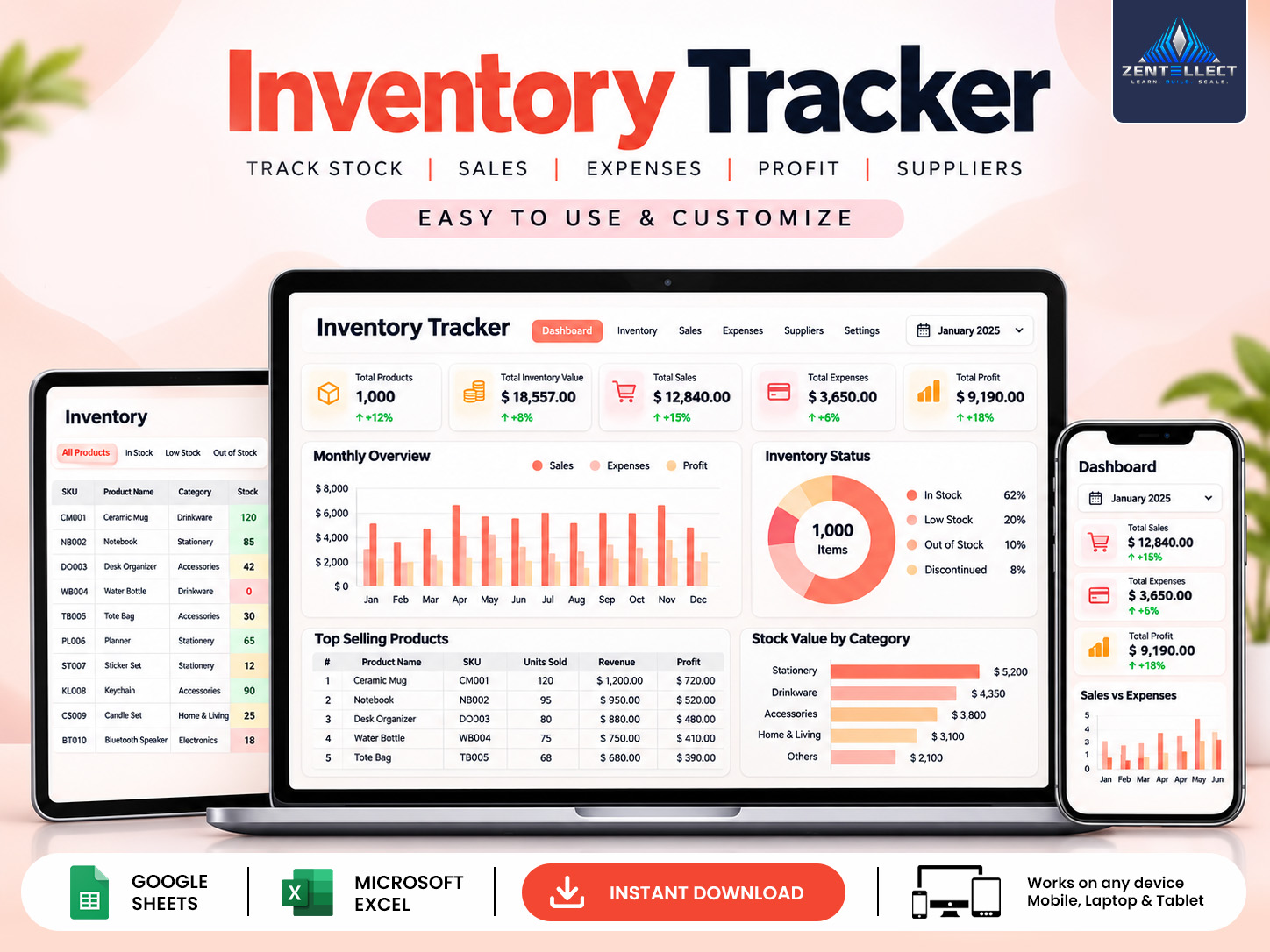
Inventory Tracker
₹1,000.00 ₹599.00
Frequently Bought Together!
Product details
Track Every Product. Control Your Stock. Grow Your Business Smarter. 📦 Take the guesswork out of inventory management with the Smart Inventory Tracker — your all-in-one digital stock management system designed to help you organize products, monitor stock levels, track inventory movement, and stay on top of your business supplies. From incoming stock and outgoing sales to low-stock alerts and inventory valuation, keep your inventory organized and make more confident purchasing decisions. Less Stock Confusion. Better Inventory Control. Smarter Business Growth. Get Your Inventory Tracker Today — Stay Stocked, Stay Organized & Keep Your Business Moving!
Know What You Have. Know What You Need. Keep Your Business Running Smoothly.
Tired of running out of popular products, overstocking slow-moving items, or spending hours trying to figure out what's available in your inventory?
Managing products, stock quantities, purchases, sales, and supplier information can quickly become overwhelming — especially as your business grows.
It's time to simplify your inventory management.
Introducing the Smart Inventory Tracker — an easy-to-use digital inventory management spreadsheet designed to help small businesses, online sellers, retailers, and entrepreneurs organize their stock, monitor inventory movement, and make smarter purchasing decisions.
Whether you're managing an online store, retail shop, warehouse, handmade business, or growing product-based company, this tracker helps you maintain a clearer picture of your inventory in one convenient place.
No more scattered stock records, confusing spreadsheets, or unnecessary inventory guesswork.
One Smart Tracker. Every Product Organized. Better Stock Decisions.
KEY BENEFITS — WHY YOU'LL LOVE IT
✔ Keep Your Entire Inventory Organized — Manage product names, categories, SKUs, quantities, and other essential inventory details in one structured system.
✔ Know Your Available Stock — Track inventory quantities to understand what's currently available and what needs replenishment.
✔ Monitor Stock In & Stock Out — Record incoming purchases, outgoing sales, and other inventory movements for better stock control.
✔ Identify Low-Stock Products — Keep track of products approaching their reorder levels and plan replenishment before stock runs out.
✔ Reduce Overstocking & Stock Shortages — Make more informed purchasing decisions based on your inventory records.
✔ Understand Your Inventory Value — Monitor the cost value of stock held by your business to support financial planning.
✔ Organize Supplier Information — Keep vendor details and purchasing references accessible for easier replenishment.
✔ Improve Inventory Accuracy — Maintain consistent records of stock transactions and reduce reliance on manual counting alone.
✔ Save Time on Stock Management — Replace scattered inventory notes with a clear, repeatable tracking process.
✔ Support Smarter Business Growth — Gain better visibility into inventory availability, stock requirements, and purchasing priorities.
WHAT'S INCLUDED — YOUR COMPLETE INVENTORY MANAGEMENT SYSTEM
1. Inventory Overview Dashboard
Get a clear snapshot of your inventory, including product counts, available quantities, low-stock items, and overall inventory value.
2. Master Product Inventory
Maintain a central product list with item names, product codes, SKUs, categories, units, and stock information.
3. Stock Inward Tracker
Record purchased goods, incoming stock quantities, delivery dates, and inventory additions.
4. Stock Outward Tracker
Track stock issued, sold, used, transferred, or otherwise removed from inventory.
5. Current Stock Balance
Monitor opening stock, stock received, stock issued, and closing quantities to maintain accurate inventory records.
6. Low-Stock & Reorder Tracker
Identify items that have reached their minimum stock levels and require replenishment.
7. Supplier & Vendor Directory
Organize supplier names, contact information, and product sourcing details for easier purchasing.
8. Purchase & Restocking Planner
Plan upcoming stock purchases and organize replenishment requirements based on inventory needs.
9. Inventory Valuation Summary
Review the estimated cost value of available inventory to understand how much capital is held in stock.
10. Inventory Performance Review
Review inventory movements, stock availability, and replenishment needs to improve inventory management decisions.
HOW THE SMART INVENTORY TRACKER WORKS
Every Product Accounted For. Every Stock Movement Organized.
Inventory management becomes easier when you can clearly see what comes in, what goes out, and what's left.
Example: Inventory Stock Overview
| ProductOpening StockStock InStock OutClosing Stock | ||||
| Product A | 100 | 50 | 80 | 70 |
| Product B | 75 | 25 | 60 | 40 |
| Product C | 200 | 100 | 150 | 150 |
| Product D | 50 | 20 | 65 | 5 |
| Product E | 120 | 30 | 90 | 60 |
The Result?
You can quickly identify:
- How much stock is currently available.
- Which products are moving out of inventory.
- Which items need replenishment.
- Where potential shortages may occur.
- How to plan your next stock purchase.
Know Your Stock. Plan Your Purchases. Stay Ready for Every Order.
Example shown for illustration. Actual layout and functionality depend on the spreadsheet design.
WHO IS THIS INVENTORY TRACKER FOR?
✔ Small Business Owners — Keep products, quantities, and stock movements organized without complicated inventory software.
✔ Retail Shop Owners — Track merchandise availability and manage replenishment requirements.
✔ E-Commerce Sellers — Organize physical product stock and prepare for customer orders.
✔ Etsy & Handmade Sellers — Monitor finished products, raw materials, and packaging supplies.
✔ Warehouse & Store Managers — Maintain structured inventory records and track incoming and outgoing items.
✔ Home-Based Entrepreneurs — Manage product stock and supplies as your business grows.
✔ Wholesalers & Distributors — Organize inventory movement and monitor product availability.
✔ Startups & Growing Businesses — Build a consistent stock management process from the beginning.
HOW IT WORKS — 3 SIMPLE STEPS
Step 1 — Add Your Products
Enter product names, SKUs, categories, opening stock quantities, and relevant inventory details.
Step 2 — Record Stock Movements
Update incoming purchases, outgoing sales, stock usage, returns, and other applicable inventory transactions.
Step 3 — Review & Replenish
Monitor available stock, identify low-stock products, and plan your next purchases based on inventory requirements.
Maintain regular updates to keep your inventory information accurate and useful.
WHY CHOOSE A SMART INVENTORY TRACKER?
Better Visibility Into Your Stock
Know what you have available instead of relying on memory, scattered records, or repeated manual checks.
Fewer Stock Shortages
Stay aware of products approaching minimum stock levels and plan replenishment in advance.
More Efficient Purchasing
Use stock records to decide what to reorder and avoid buying unnecessary quantities.
Improved Inventory Accountability
Maintain a clear record of stock received, issued, and remaining.
Smarter Cash Flow Planning
Understand how much money is tied up in inventory and make more informed purchasing decisions.
A Scalable Inventory Routine
Create an organized tracking process that can support your business as your product range grows.
FREQUENTLY ASKED QUESTIONS
What is a Smart Inventory Tracker?
A Smart Inventory Tracker is a digital spreadsheet that helps businesses organize product information, track stock movements, monitor available quantities, and manage replenishment planning.
Can I track multiple products?
Yes. You can organize different products and categories, subject to the template's structure and capacity.
Can I monitor stock in and stock out?
Yes, when the template includes stock movement fields or transaction logs.
Does the tracker calculate available stock automatically?
Automatic stock calculations are available only if the product includes formulas that update balances from recorded transactions.
Can I identify products that need restocking?
Yes. A reorder-level system can help identify low-stock items. Automated warning indicators depend on the template's functionality.
Can I use this for an online business?
Yes. It can support inventory tracking for physical products sold through online marketplaces and independent e-commerce stores.
Does it automatically connect to Shopify, Etsy, or other selling platforms?
Not unless a supported integration is included. Standard inventory spreadsheets generally require manual data entry or import.
Is this suitable for beginners?
Yes. The basic workflow is straightforward: add products, record stock movements, and review inventory balances.
STOP GUESSING YOUR STOCK — START MANAGING IT SMARTER!
Your business deserves more than scattered inventory lists and last-minute stock checks.
Stop worrying about unexpected shortages, unnecessary purchases, and confusing stock records.
With the Smart Inventory Tracker, you can organize your products, monitor inventory movement, and make more confident purchasing and restocking decisions.
Whether you're managing ten products or building a growing inventory operation, start with a system that helps you stay organized and in control.
Every Product Tracked. Every Stock Movement Recorded. Every Purchase Better Planned.
Get Your Smart Inventory Tracker Today — Take Control of Your Stock & Keep Your Business Moving! 📦
Premium templates
Why Choose Our Templates
Smart Automation
Templates calculate everything automatically once you enter your numbers.
Beginner-Friendly
Step-by-step instructions and clear layouts make everything easy to follow.
Instant Setup
Plug in your data and start using the templates within minutes.
Lifetime Access
Enjoy free updates and improvements for your templates forever.
Simple process
Here’s How It Works
From checkout to organized — three quick steps and you are ready to go.
Purchase
Once your payment is cleared, your files will be instantly available for download.
Download
For Google Sheets, open the PDF and click the link to make your own copy. For Excel, open the file directly.
Start Using
Follow the simple instructions to set up, personalize, and begin organizing in just minutes.